Meshing 02#
Mesher for tetrahedron elements may be more useful for creating the mesh conforming complex geometry. This chapter presents two sets of the mesher, the mesher with uneven tetrahedron elements size, and the mesher for more uniformly same, or similar size of tetrahedron shape.
Tetrahedron Mesher#
Artisan has an integrated simple tetrahedron elements mesher that automatically meshes the given geometry using Delaunay triangulation algorithm. This basic meshing algorithm discretize the geometry layer-by-layer that conforms the geometric shape. The following JSON, that stores at the file GenTetBasicMesh.json, meshed a sphere with the radius of 600 mm and generated the mesh lattice by using the exactly same mesh.
{"Setup":{  "Type" : "Geometry",
            "Geomfile": ".//sample-obj//Ball_Mesh.STL",
            "Rot" : [0.0,0.0,0.0],
            "res":[5.0,5.0,5.0],
                            "Padding": 4,
            "onGPU": false,
            "memorylimit": 16106127360
            },
"WorkFlow":{
      "1": {"Gen_TetBasicMesh":{
                "Geomfile": ".//sample-obj//Ball_Mesh.STL",
                                    "size": [100.0,100.0,100.0],
                                    "Meshfile": ".//sample-obj//Ball_Mesh.med",
                "ConvertTet2Beam": true
                }
           },
      "2": {"Add_Lattice":{
                "la_name": ".//Test_json_03//GenTetBasicMesh.mld",
                "size": [150.0,150.0,150.0], "thk":10.0, "Rot":[0.0, 0.0, 0.0], "Trans":[0.0, 0.0, 0.0],
                "Inv": false, "Fill": false, "Cube_Request": {}
                }
           },
      "3": {
            "Export": {"outfile": ".//Test_results/BallBasicTetNMesh_Lattice.stl"}
           }
                      },
"PostProcess":{"CombineMeshes": true,
            "RemovePartitionMeshFile": false,
            "RemoveIsolatedParts": true,
            "ExportLazPts": true}
 }
The keywords Gen_TetBasicMesh activates the algorithm. The parameter "Geomfile" defines the location of the target meshing geometry, Meshfile indicates where the mesh would be stored. Currently it supports Abaqus inp, Ansys fluent msh and Salome med file format. The parameter "size" defines the lattice size at current layer as
num_{nodes} is the number of nodes at current layer, and they were evenly and randomly distributed over the current layer surface. The value size[2], which is the third element in size, defines the layer depth, here 100 mm depth. The parameter ConvertTet2Beam is boolean type definition, that "true" meant the mesher will convert generated tetrahedron to the beam element (a 2-node-strut-like element), false will keep tetrahedron element. One of the benefits is user may import the beam element into the FEA solver for further analysis if the mesh lattice is desired.
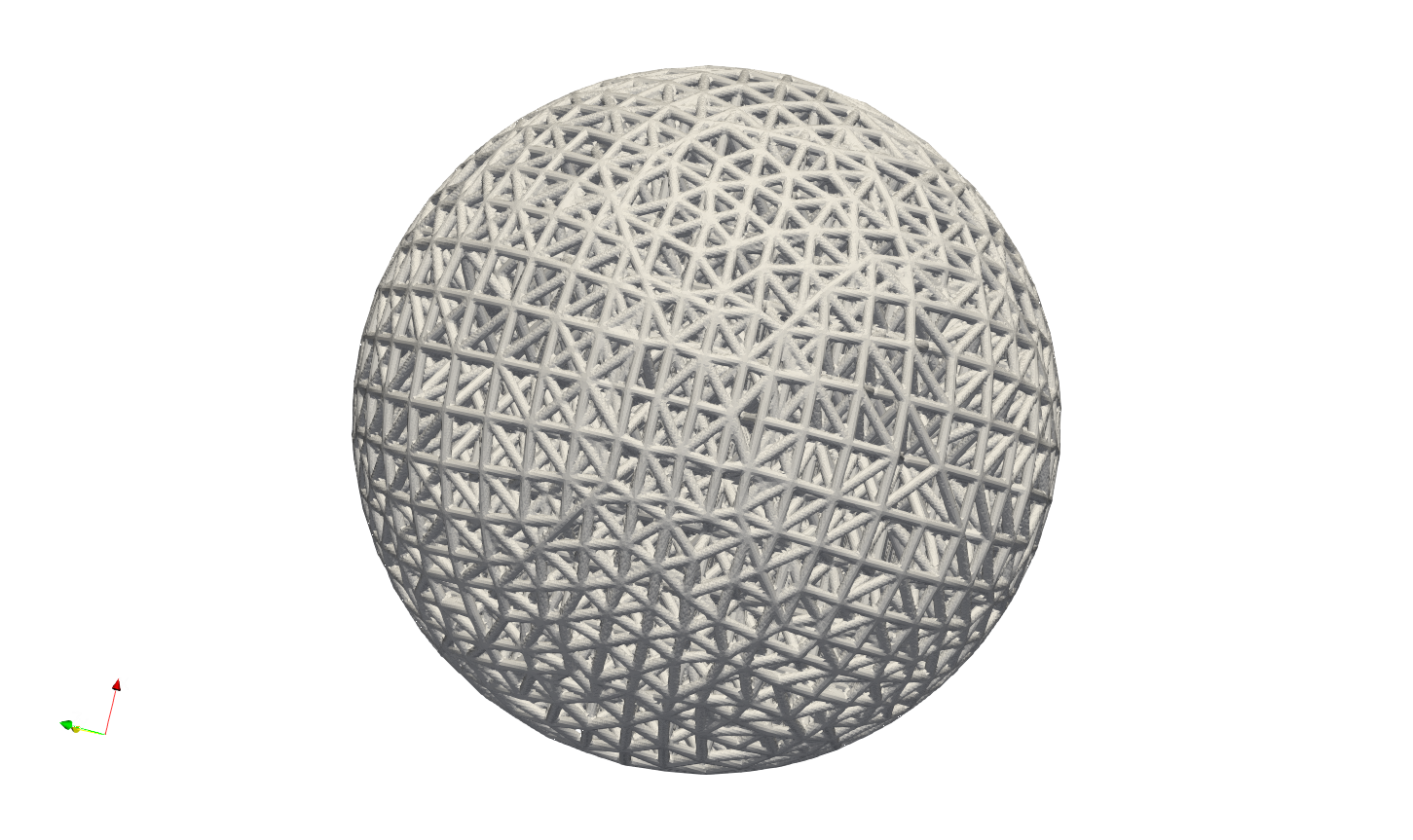
Above JSON produced a mesh lattice filled ball geometry as shown below.

The cross-sectional view below clearly showed the lattices were stacked layer by layer, from exterior surface towards center.

For the more complicated case, user may refer to the example in the file EngineBracket_GenTetBasicMesh.txt.
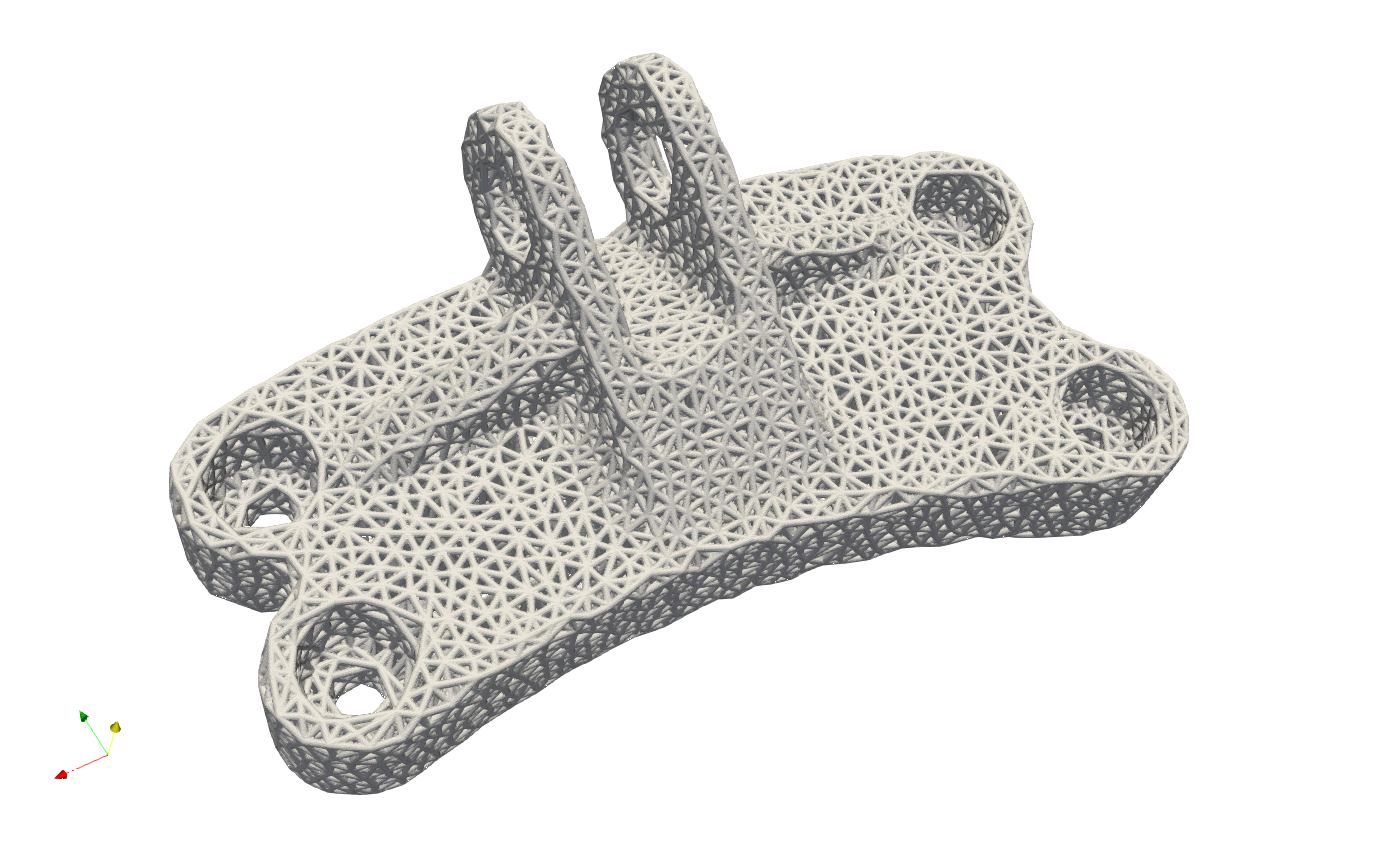
Please note that, this simple mesher may apply to the geometry with less dramatic change and more continuously smooth surface change. The quality of mesh may vary depending on the geometry features and definitions of mesh size etc.. For more complex mesh pattern, user may consider use professional mesher and import the results as input in mesh lattice generation workflow. Or user shall use the Gen_TetBasicMesh_HexSplit to generate a better evenly sized or controlled-size mesh in order to fit the geometric shape.
The Gen_TetBasicMesh_HexSplit keyword shares the same parameters with Gen_TetBasicMesh. This mesher accepts the nodes of the Cartesian Hex Mesh (refer to the Cartesian Mesher section) as input vertices and applies the tetrahedron algorithm to generate all tetrahedral elements. Users can refer to the example GenTetBasicMesh_HexSplit.json, as illustrated below. One advantage of this method is that the mesher produces approximately evenly spaced vertices that are distributed across the shape’s surface and volumetric domain.
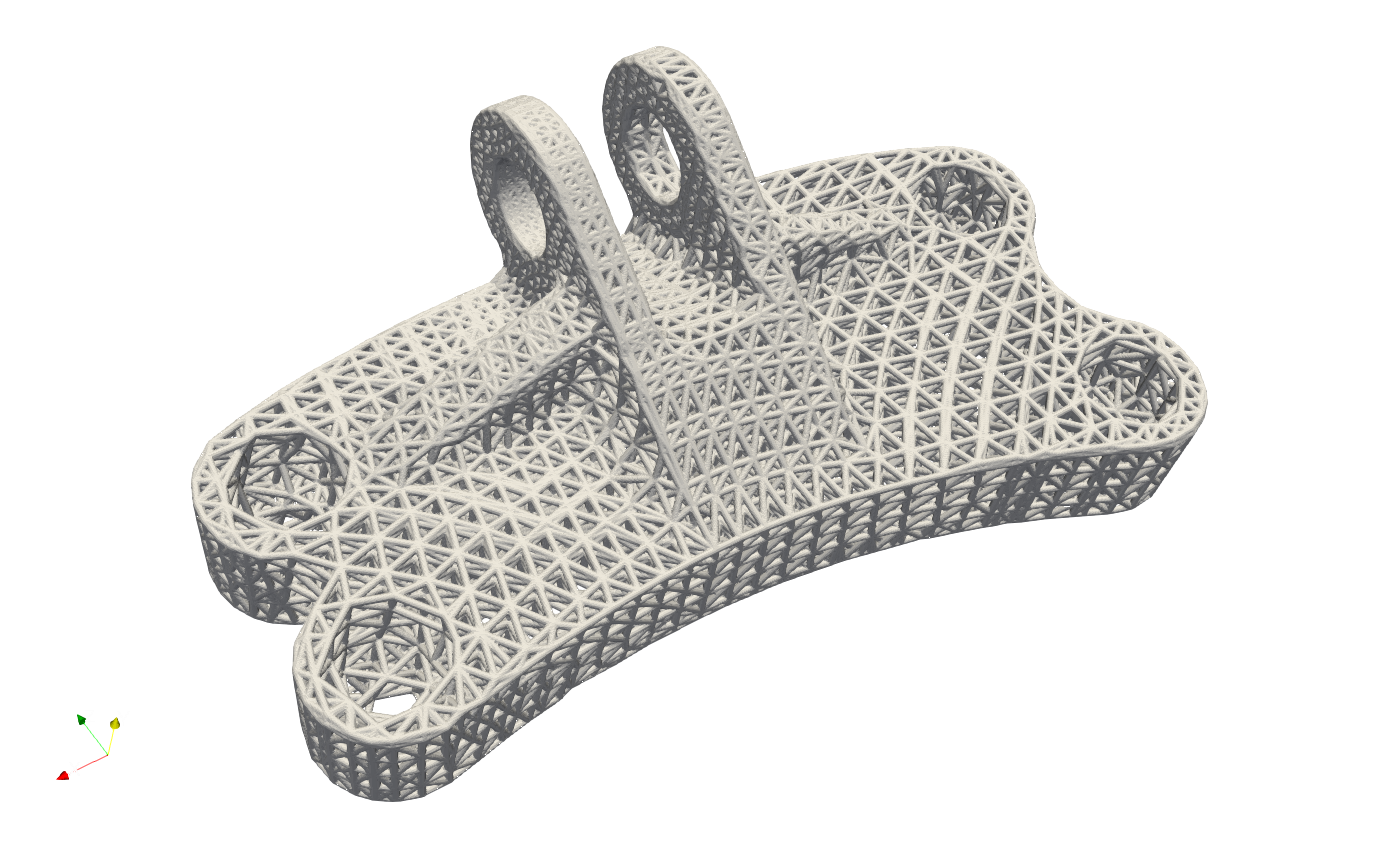
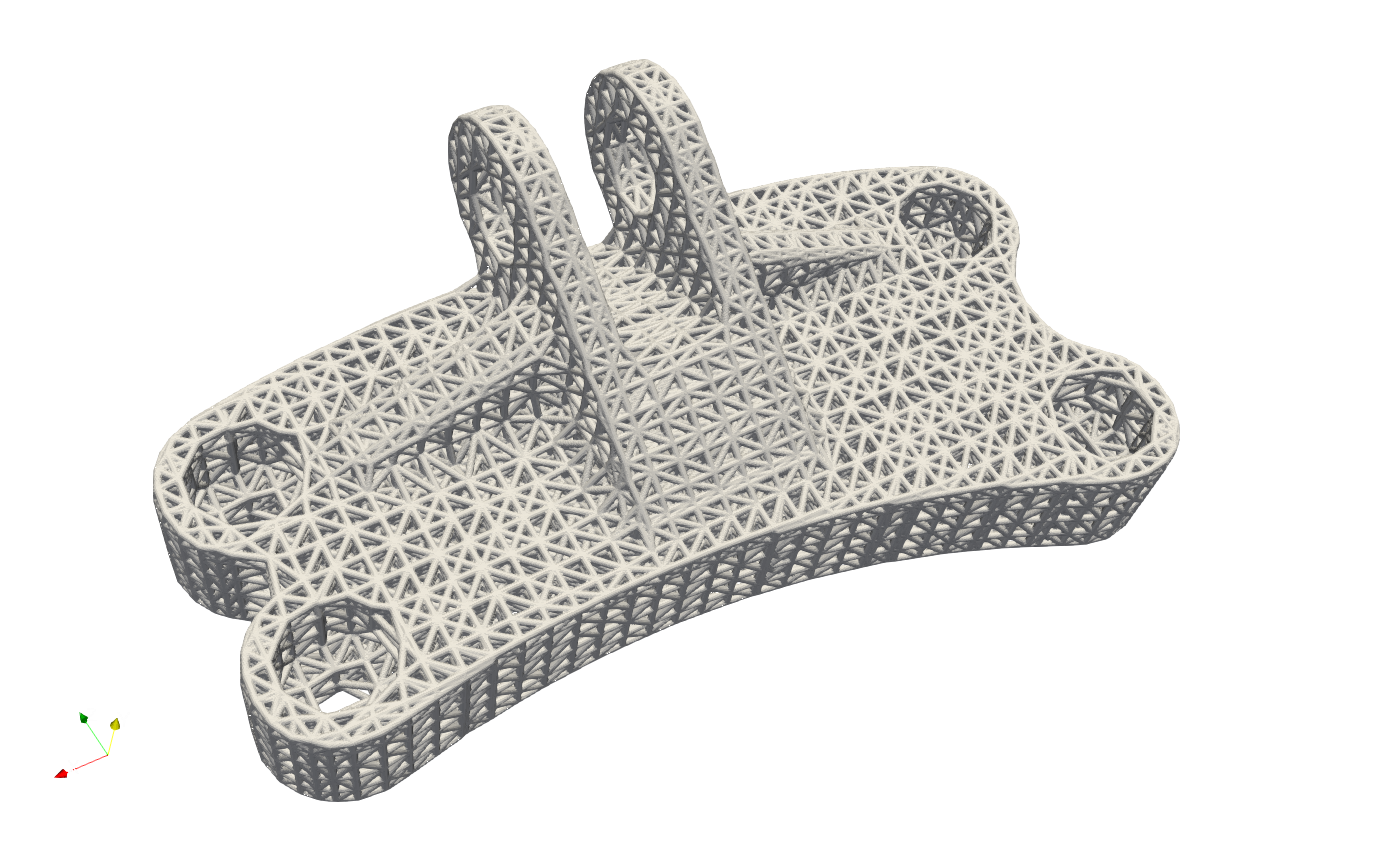
Similar to Gen_BasicCartesianHexMesh_MultiSize, the local mesh variation can be included as well. The example in the file EngineBracket_MultiSize\EngineBracket_GenTetBasicMesh_HexSplit_MS.json shows a more complicated case, the Engine Bracket model with a local attractor controlled mesh size.
{"Setup":{ "Type" : "Geometry",
           "Geomfile": ".//sample-obj/EngineBracket.stl",
           "Rot" : [0.0,0.0,0.0],
           "res":[0.30, 0.30, 0.30],
                    "Padding": 4,
           "onGPU": false,
           "memorylimit": 16106127360
           },
"WorkFlow":{
     "1": {"Gen_TetBasicMesh_HexSplit":{
           "Geomfile": ".//sample-obj/EngineBracket.stl",
                 "size": [6.0, 6.0, 6.0],
                 "Meshfile": ".//Test_json//MeshLattice//EngineBracket_MultiSize//EngineBracket.med",
           "ConvertTet2Beam": false,
           "MultiSize":{"Type":"Attractor", "Data":[[105, 45, 90, 100, 0.9]]}
           }
          },
     "2": {"Add_Lattice":{
               "la_name": ".//Test_json//MeshLattice//EngineBracket_MultiSize//GenTetBasicMesh.mld",
               "size": [12.0, 12.0, 12.0], "thk":0.7,
               "Rot":[0.0,0.0,0.0], "Trans":[0.0,0.0,0.0], "Inv": false, "Fill": false,
               "Cube_Request": {}
               }
          },
     "3":{
         "Export": {"outfile": ".//Test_results/EngineBracket_BasicTetHexSplit_MS.stl"}
         }
              },
"PostProcess":{"CombineMeshes": true,
           "RemovePartitionMeshFile": false,
           "RemoveIsolatedParts": true,
           "ExportLazPts": true}
}
The area on the left of Bracket ring has higher mesh density, or smaller mesh size, whereas other region has comparatively bigger mesh size.
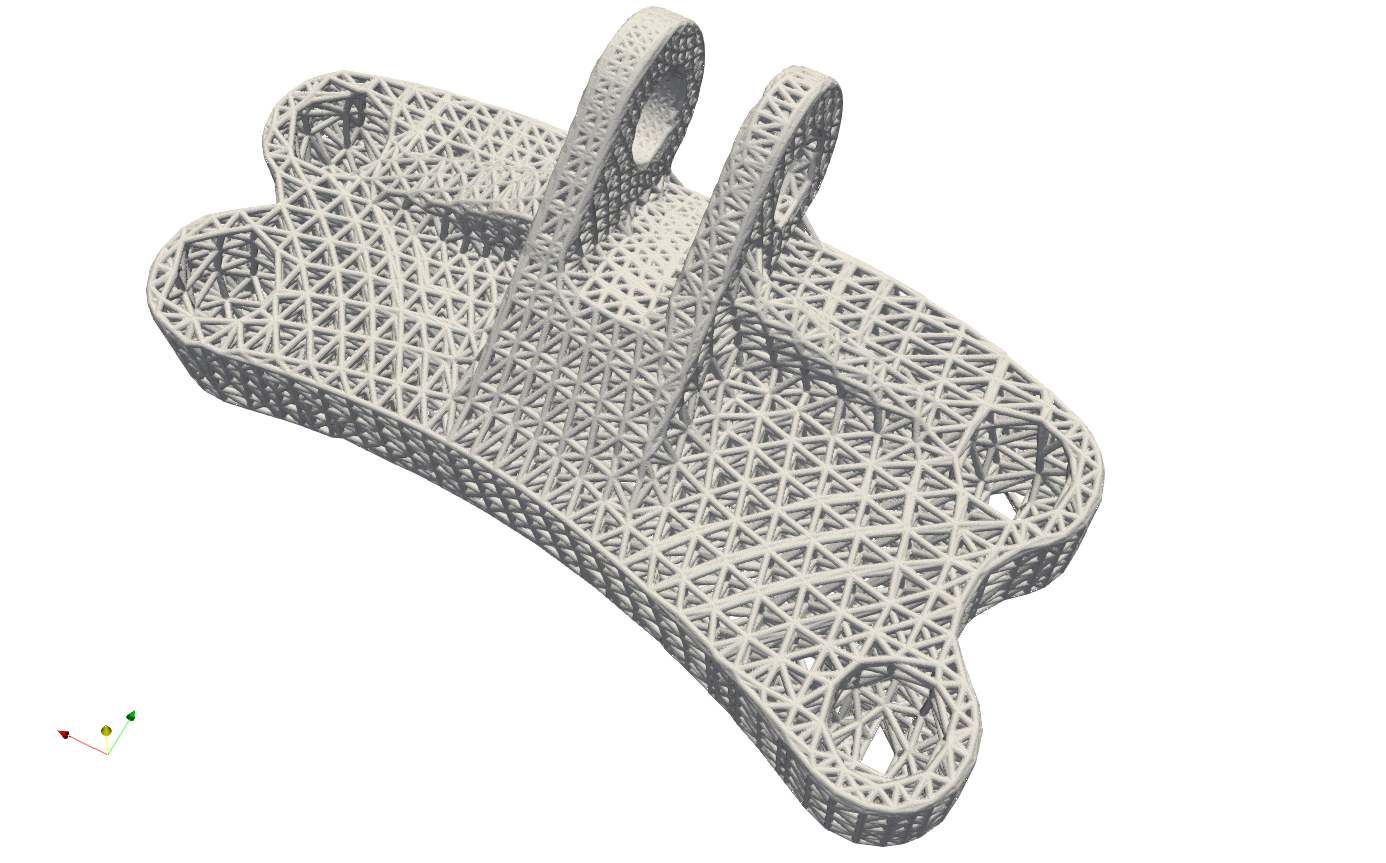
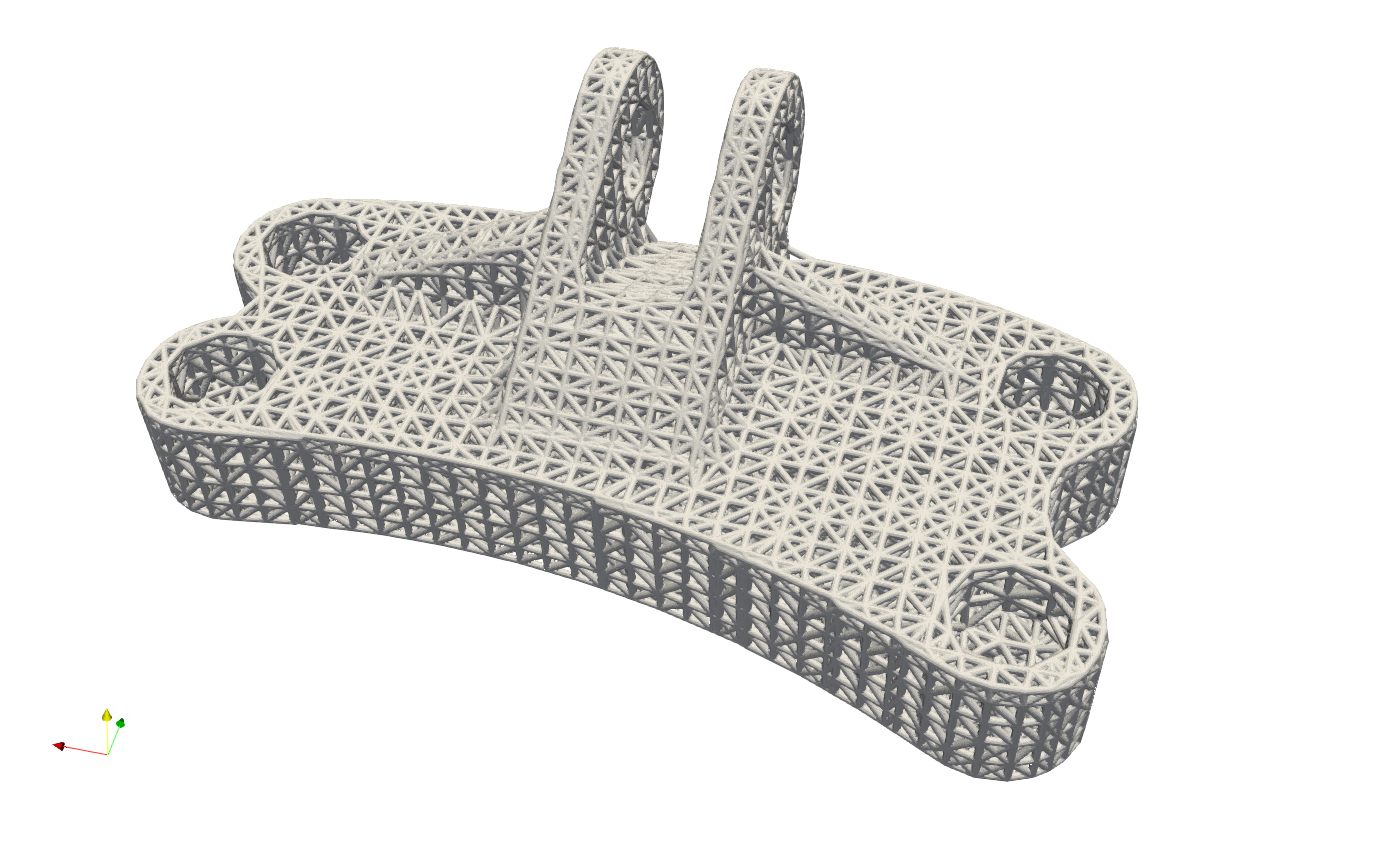
For comparison, below shows the mesh without the local attractors, the example file is at EngineBracket\EngineBracket_GenTetBasicMesh_HexSplit.json.
Adaptive Tetrahedron Mesher#
Artisan provides an adaptive level-set mesher to generate a tetrahedron mesh from a closed, consistently oriented triangle surface. The adaptive algorithm starts with a coarse box enclosing the geometry and splits each grid cell consistently into six tetrahedra. A size field requests smaller elements near the surface, with additional refinement near sharp source edges. The mesher adapts the background mesh, and the signed distance is evaluated again from the original STL at every new background vertex. Refinement is repeated until potentially intersecting cells meet the resolution check and interior samples are available. The mesher then discretizes the zero level-set and improves the mesh. Only the solid region, where the signed distance is negative, is exported. The example below is stored at .Test_jsonMeshLatticeAdaptiveTetEngineBracket_AdaptiveTet.json.
{
  "Setup": {
    "Type": "Sample",
    "Sample": {
      "Domain": [
        [
          0.0,
          1.0
        ],
        [
          0.0,
          1.0
        ],
        [
          0.0,
          1.0
        ]
      ],
      "Shape": "Box"
    },
    "Geomfile": "",
    "Rot": [
      0.0,
      0.0,
      0.0
    ],
    "res": [
      0.5,
      0.5,
      0.5
    ],
    "Padding": 1,
    "onGPU": false,
    "memorylimit": 16106127360
  },
  "WorkFlow": {
    "1": {
      "Gen_TetMesh_Adaptive": {
        "mesh_file": ".//sample-obj//EngineBracket.stl",
        "export_mesh": ".//Test_json//MeshLattice//AdaptiveTet//EngineBracket_Adaptive.inp",
        "sampling_size": [
          6.0,
          6.0,
          6.0
        ],
        "padding": 12.0,
        "hsiz": 3.0,
        "hmin": 0.0,
        "hmax": 0.0,
        "hausd": 0.1,
        "hgrad": 1.3,
        "angle": 45.0,
        "detect_sharp_edges": false,
        "allow_swaps": true,
        "max_points": 750000,
        "adaptive": true,
        "surface_size": 1.5,
        "feature_size": 0.75,
        "adapt_band": 1.5,
        "adapt_iterations": 8
      }
    }
  },
  "PostProcess": {
    "CombineMeshes": false,
    "RemovePartitionMeshFile": false,
    "RemoveIsolatedParts": false,
    "ExportLazPts": false
  }
}
The keyword Gen_TetMesh_Adaptive activates this algorithm. The input and output meshes are managed by the existing mesh interface, which supports mesh files and mesh container IDs. This operation does not use the field resolution in Setup; its background resolution is defined by sampling_size.
Parameter |
Description |
|---|---|
|
Triangle surface file or mesh container ID. An empty string uses the geometry file defined in Setup. |
|
Output volume mesh file or mesh container ID. Use a tetrahedron format such as inp, vtk, vtu or med; STL stores surface triangles only. |
|
Required positive scalar or three positive lengths defining the initial box grid spacing. In adaptive mode this is the coarse starting resolution. With adaptive false, the welded STL vertices are added to the grid before Delaunay triangulation. This is independent of the final element size. |
|
Boolean option enabling geometry-aware background refinement before level-set extraction. The default is false, retaining the grid and STL vertex sampling method. The example enables adaptive mode, which does not insert STL vertices into the initial grid. |
|
Positive target background edge size near the STL in adaptive mode. If omitted, half the smallest sampling_size is used. It must not exceed the smallest sampling_size. Smaller values improve geometric sampling at increased memory and runtime cost. |
|
Positive target background edge size near sharp source edges. If omitted, half surface_size is used. It must not exceed surface_size. This refines the distance field; it does not constrain the final mesh to the original STL edges. |
|
Positive width of the fine sampling band near the surface, in mesh units. If omitted, twice surface_size is used. Background sizes grow away from this band towards the coarse grid size. |
|
Maximum number of background adaptation passes, from 1 to 20. The default is 8. Distances are recomputed from the original STL after each pass. If the background does not reach the resolution check, execution stops before mesh export. |
|
Positive minimum distance from the geometry bounding box to the background box, in mesh units. If omitted, one sampling interval is added along each axis. The grid origin is offset by 0.37 sampling intervals, and the upper limit is expanded to retain the requested spacing. |
|
Optional non-negative surface vertex welding distance, in mesh units. If omitted, 64 times double-precision machine epsilon times the coordinate scale is used to merge numerical seams. Zero enables only exact duplicate welding. Larger values can remove small features. |
|
Constant target element size for the mesher. Zero leaves it unspecified. Geometry and size gradation can produce smaller elements. |
|
Lower and upper target edge-size bounds. Zero leaves the corresponding bound automatic. A positive hmin must not exceed a positive hmax. |
|
Positive tolerance for boundary approximation, in mesh units. This controls the final mesh boundary approximation. Background sampling uses surface_size and feature_size independently. It does not guarantee the maximum distance to the original STL. |
|
Element-size gradation factor for background adaptation and final meshing, greater than 1. The default is 1.3; -1 disables gradation. Values very close to 1 can spread fine sizes over a large region. |
|
Angle threshold in degrees for sharp-edge detection, between 0 and 180. Adaptive mode uses this to find source edges for finer background sampling. The final mesher uses it for ridge detection when detect_sharp_edges is true. |
|
Boolean option for automatic ridge detection. The default is false for level-set meshing. This does not guarantee preservation of sharp STL edges. |
|
Boolean option enabling edge swaps. The default is true. Set it to false if the mesher reports a swapping failure; disabling swaps can limit attainable mesh quality. |
|
Maximum background point count. The initial grid is checked before allocation, and every adapted background is checked after the mesher returns. With adaptive false, the combined grid and STL count is checked before tetrahedralization. The default is 250000. Exceeding the limit stops export. This does not cap internal mesher memory, transient allocations, final solid vertex count or element count. |
The mesher output level is fixed at -1 (quiet mode) and is not a JSON parameter. Errors may still be printed.
All lengths use the input mesh coordinate units. The surface must be watertight, free of self-intersections, and oriented with outward normals, including appropriate inward orientation on cavity walls. Exact duplicate vertices and seams differing only at floating-point precision are welded before sampling. The output nodes are compacted and tetrahedron indices are zero-based in the Python interface.
The output is an approximation of the sampled level-set surface. Adaptive mode checks all tetrahedra whose enclosing sphere can touch the STL, including cells with no initial sign change. Potentially intersecting cells must have no edge longer than 2.5 times their local target size, and both interior and exterior samples must be present before extraction. Refinement is progressive, and completed refinements are retained on later passes. This is a simple background size check. No strict center-distance error tolerance is imposed. It does not guarantee the distance to the original STL or preservation of its topology. The refinement history is available as LastAdaptationReport on the Python workflow object.
Sharp edges, thin walls, small holes and small disconnected components require sufficiently small surface_size and feature_size. The algorithm does not measure every wall thickness or guarantee recovery of every feature. Choose surface_size smaller than the smallest feature of interest and compare the exported boundary and volume with the source geometry. Reducing hsiz or hausd alone does not recover features missing from the background samples. The final element sizes remain controlled by hsiz, hmin and hmax; a large final element size can also reduce the benefit of finer sampling.
With adaptive false, the original STL vertices are added after duplicate and numerical seam welding. SciPy Delaunay triangulation generates the background from the combined points, and the surface samples are assigned a zero level-set value. If Delaunay fails the box coverage and conformity checks, the consistent grid split is used and every surface vertex is inserted into all incident tetrahedra. Adding these points does not constrain the background to reproduce the original triangles or require the mesher to retain the vertices in the final mesh. This mode retains the previous sampling behaviour.
Implicit Tetrahedron Mesher#
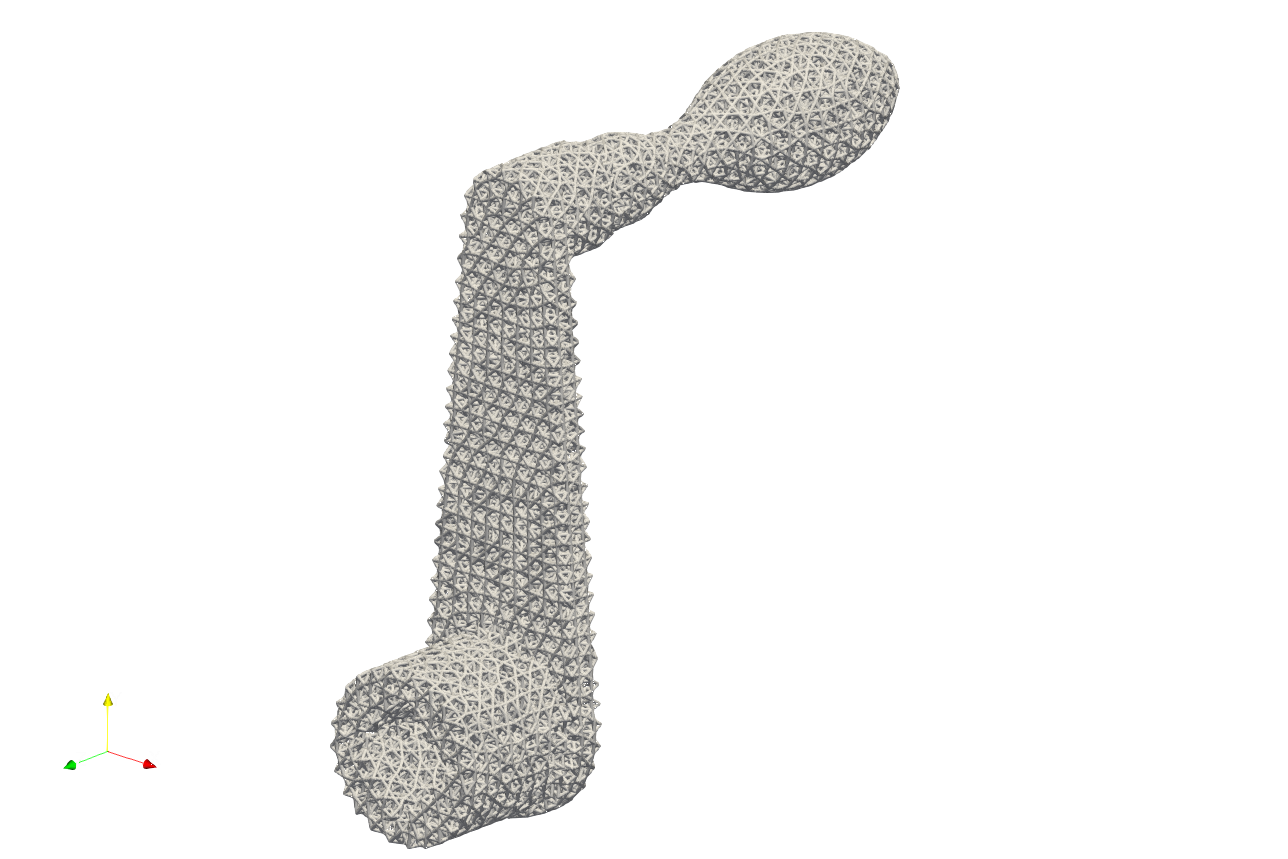
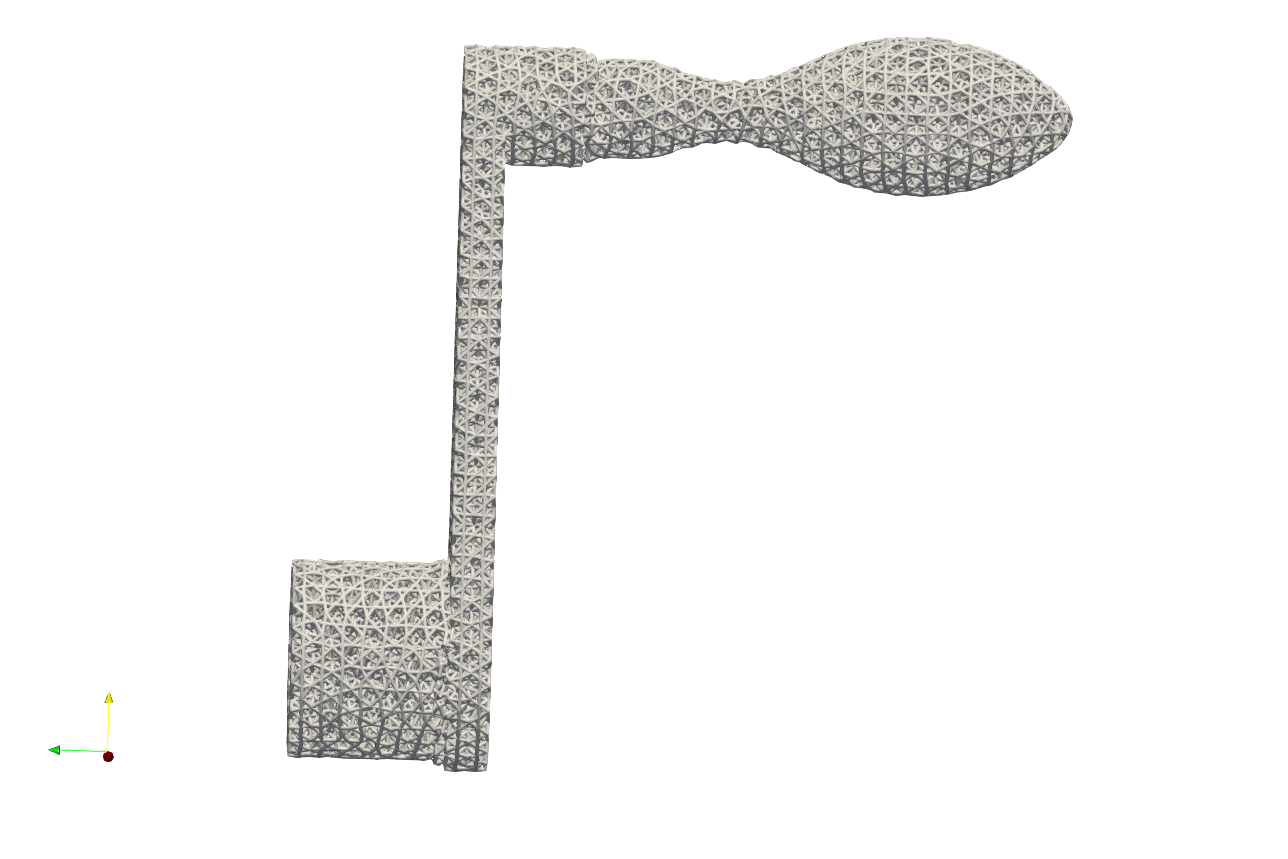
Artisan integrates an simple implicit based tetrahedron mesher that generates uniform size elements (infill domain for unit lattice). This mesher is able to capture the geometrical features, such as corner or sharp edges, that can produce better quality tet mesh which are evenly distributed over the geometry domain. User may find the example below at .\Test_json\MeshLattice\TetwF\crankhandleTetMesher.json.
{
    "Setup": {
        "Type": "Geometry",
        "Sample": {
            "Domain": [[0.0, 1.0], [0.0, 1.0], [0.0, 1.0]],
            "Shape": "Box"
        },
        "Geomfile": ".//sample-obj//crank_handle.stl",
        "Rot": [0.0, 0.0, 0.0],
        "res": [0.1, 0.1, 0.1],
        "Padding": 4,
        "onGPU": false,
        "memorylimit": 1073741824000
    },
    "WorkFlow": {
        "1": {
            "Gen_TetBasicMesh_wFeature": {
                "Meshfile": ".//Test_json//MeshLattice//TetwF//crank_handle.inp",
                "Geomfile": ".//sample-obj//crank_handle.stl",
                "init_seed_size": [2.0, 2.0, 2.0],
                "convergence_tol": 0.01,
                "max_iter": 100,
                "elem_size": 2.0
            }
        },
        "2": {
            "Add_Lattice": {
                "la_name": ".//Test_json//MeshLattice//TetwF//TetConformal.mld",
                "size": [2.0, 2.0, 2.0],
                "thk": 0.2,
                "Rot": [0.0, 0.0, 0.0],
                "Trans": [0.0, 0.0, 0.0],
                "Inv": false,
                "Fill": false,
                "Cube_Request": {}
            }
        },
        "10000": {
            "Export": {
                "outfile": ".//Test_results//crankhandle_tet_infill.stl"
            }
        }
    },
    "PostProcess": {
        "CombineMeshes": true,
        "RemovePartitionMeshFile": false,
        "RemoveIsolatedParts": true,
        "ExportLazPts": false
    }
}
The keyword Gen_TetBasicMesh_wFeature defines the mesh generation.
Parameter |
Details |
|---|---|
|
The skin mesh inputs file, if empty, Artisan will take the Geomfile in setup; |
|
The export file for generated tet mesh; |
|
The parameter defines the initial nodes points placements within the bounding box of the geometry; |
|
The target element size, please note that the final mesh may not reach to this size due to number of nodes placed over the domain; |
|
The tolerance of the convergence for mesh generation, recommend the value of |
|
The maximum iteration for mesh generation, recommend |
Above example produces a tetrahedron mesh based infill.
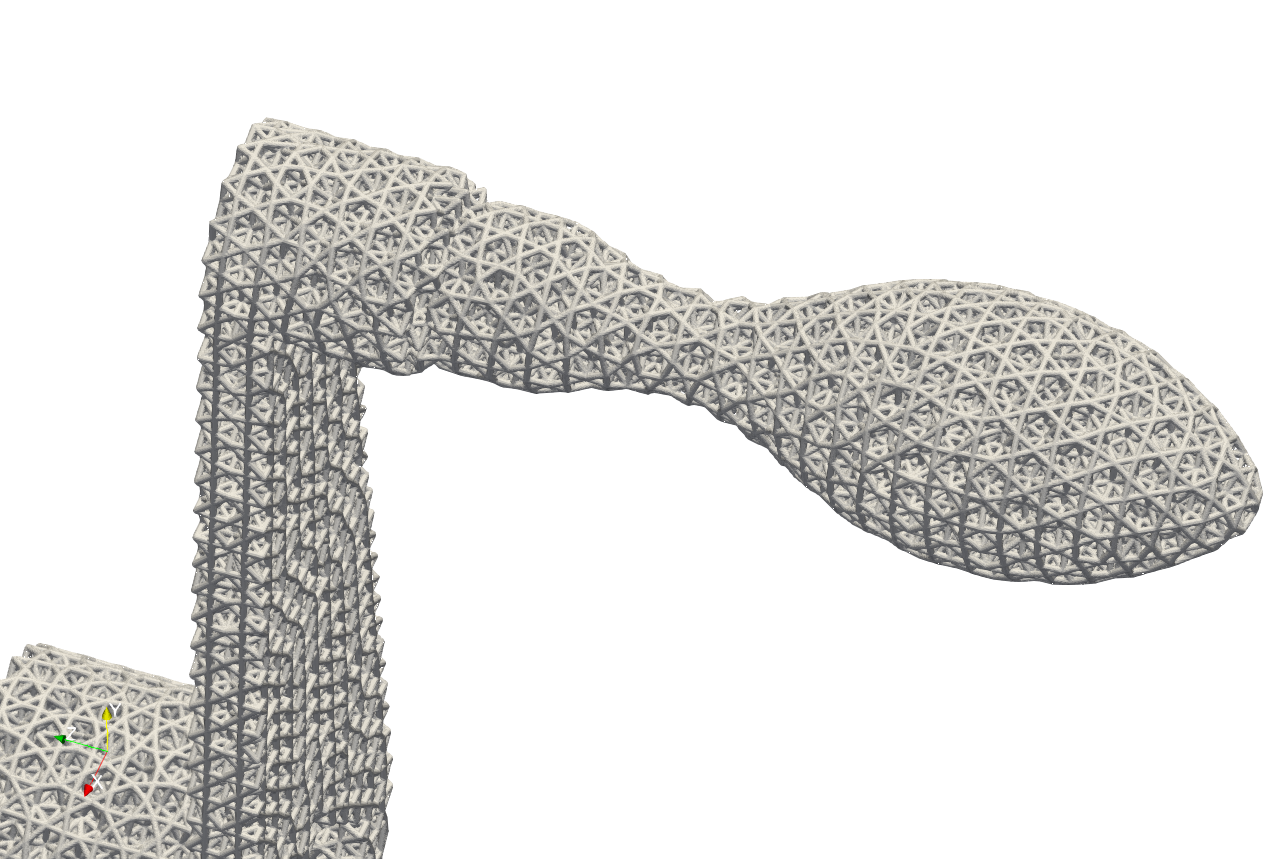
Note that, the keyword Gen_TetBasicMesh_wFeature does not support the varying size of the elements in the current version, but it shall be supported in future development.
Mesh Container#
The mesh can be stored in container variables for further processing. Exporting the mesh to a file is not necessary; it only needs to be kept in memory and associated with an ID. Users can find various examples at .\Test_json\MeshLattice\MeshContainer\. Below is a simple example, ExtractMeshSurf.json, demonstrating the use of the mesh container.
 {
  "Setup": {
      "Type": "Sample",
      "Sample": {
          "Domain": [[-10.0, 10.0], [-10.0, 10.0], [-10.0, 10.0]],
          "Shape": "Box"
      },
      "Geomfile": "",
      "Rot": [0.0, 0.0, 0.0],
      "res": [0.1, 0.1, 0.1],
      "Padding": 1,
      "onGPU": false,
      "memorylimit": 1073741824000
  },
  "WorkFlow": {
      "1": {
          "Gen_CylindricalMesh": {
              "num_elem": [3, 10, 3],
              "r_range": [2.0, 8.0],
              "phi_range": [0.0, 1.0],
              "ori": [0.0, 0.0, -2.0],
              "Height": 10.0,
              "Normal": [0.0, 0.0, 1.0],
              "Mesh_file": "CylindricalMesh"
          }
      },
      "2": {
          "Proc_Mesh_ExtractSurf": {
              "Elem_Type": "Hex",
              "inp_meshfile": "CylindricalMesh",
              "out_meshfile": "CylindricalMeshExterior",
              "isSplitTris": true
          }
      },
      "3": {
          "Add_Lattice": {
              "la_name": ".//Test_json//MeshContainer//GenCylindricalSurfMesh.mld",
              "size": [3.0, 3.0, 3.0],
              "thk": 0.25,
              "Rot": [0.0, 0.0, 0.0],
              "Trans": [0.0, 0.0, 0.0],
              "Inv": false,
              "Fill": false,
              "Cube_Request": {}
          }
      },
      "4": {
          "ExportMeshID": {
              "MeshID": "CylindricalMeshExterior",
              "out_meshfile": ".//Test_results/CylindricalMeshExterior.stl",
              "elem_type": "Triangle"
          }
      },
      "9999": {
          "Export": {
              "outfile": ".//Test_results/CylindricalMesh_ConformalLattice.stl"
          }
      }
  },
  "PostProcess": {
      "CombineMeshes": true,
      "RemovePartitionMeshFile": false,
      "RemoveIsolatedParts": true,
      "ExportLazPts": true
  }
}
And the mesh lattice definition file .//Test_json//MeshContainer//GenCylindricalSurfMesh.mld is shown below.
{
  "type": "MeshLattice",
  "definition": {
      "meshfile": "CylindricalMeshExterior"
  }
}
The keywords Gen_CylindricalMesh and Proc_Mesh_ExtractSurf are used to generate the mesh and extract the surface mesh respectively. The keyword ExportMeshID is used to export the mesh data stored in the container. In the example above, the mesh data stored in the container with the mesh ID CylindricalMeshExterior is exported to the file CylindricalMeshExterior.stl, and the container also was used to provide the mesh data for the mesh lattice generation. User may also use the keyword ReadMesh to read the mesh file and store the data associated with the mesh ID in the container, as shown by the example Parts01_Mesh_Infill_LR.json below. At the end of the workflow, the keyword RemoveMesh delete the mesh from container for releasing memory.
{"Setup":{    "Type" : "Geometry",
              "Geomfile": ".//sample-obj//Parts01//Parts01.stl",
              "Rot" : [0.0,0.0,0.0],
              "res":[0.25,0.25,0.25],
              "Padding": 2,
              "onGPU": false,
              "memorylimit": 16106127360
              },
 "WorkFlow":{
        "1": {"ReadMesh":{"MeshID":"TestMesh", "meshfile":".//sample-obj//Parts01//Parts01.med", "elem_type":"Tet"}},
        "2": {"Add_Lattice":{
                  "la_name": ".//Test_json//MeshContainer//Parts01_Mesh_Infill_LR.mld", "size": [4.0,4.0,4.0], "thk":0.3, "Rot":[0.75,0.0,0.0], "Trans":[0.0,0.0,0.0], "Inv": false, "Fill": false,
                  "Cube_Request": {}
                  }
             },
        "3":{"RemoveMesh":{"MeshID":"TestMesh"}},
        "999":{"Export": {"outfile": ".//Test_results/Parts01_Mesh_Infill.stl"}}
         },
 "PostProcess":{"CombineMeshes": true,
              "RemovePartitionMeshFile": false,
              "RemoveIsolatedParts": false,
              "ExportLazPts": false}
}
Tetrahedral Lattice Layout from a Size Field#
Gen_TetMesh_SizeField generates tetrahedral cell domains whose sizes follow
a scalar field. Use these domains to place a conformal lattice. The mesher
itself produces a volume mesh; the subsequent lattice steps create the struts.
{
  "Gen_TetMesh_SizeField": {
    "mesh_file": "Solid",
    "export_mesh": "TetDomains",
    "size_field": "CellSize",
    "sampling_size": 0.75,
    "hausd": 0.03,
    "surface_tolerance": 0.06,
    "hgrad": 1.3,
    "size_iterations": 3,
    "quality_report": ".//Test_results//TetSizeField_quality.json"
  }
}
Parameter |
Meaning |
|---|---|
|
Closed triangle-surface file or mesh-container ID, resolved through MeshInterface. |
|
Output tet-mesh file path or mesh-container ID. An ID such as
|
|
Existing scalar grid-field ID. Values must be finite, strictly positive target edge lengths in model units. |
|
Positive initial interior seed size. The scalar field controls the final size targets; boundary edges in the seed may be larger. |
Prepare the geometry and field#
The surface must be a single connected, closed, manifold, non-self-intersecting triangle shell. Separate solids and nested cavity shells are not supported.
Create the field with Scalar Fields from Geometry Regions, or load a saved
HDF5 field using ReadGridField. It must cover the whole solid on a
rectilinear 3D grid with at least two points per axis. Values are interpolated
between grid points; there is no fallback outside the field.
Setup.res controls field sampling, not tet size. For this workflow, use
sufficient Setup.memorylimit to keep the complete domain in one partition.
A partial field cannot size the entire solid.
Adjust meshing controls#
The example values above suit the accompanying box example. Optional controls use the defaults below when omitted.
Parameter |
Default |
Meaning |
|---|---|---|
|
0.01 |
Positive boundary approximation tolerance for each adaptation pass. |
|
2 x |
Positive final sampled distance limit against the original surface. Exceeding it rejects the output. |
|
1.3 |
Size gradation control; must be greater than 1. |
|
true |
Enable sharp-feature detection during adaptation. |
|
45 |
Feature-detection angle, in degrees from 0 to 180. |
|
3 |
Number of adaptation passes, from 2 to 20. |
|
250000 |
Vertex limit checked around native meshing calls. It is not a hard limit on peak memory use inside those calls. |
|
No file |
Optional JSON report path. Its parent directory must exist and the path must differ from the input and output meshes. |
Read the result#
Tet sizes are approximate: boundary shape, element quality and grading also affect them. The report compares requested and achieved edge sizes and records element counts, volume, shape quality and sampled boundary error. A successful check does not prove exact size matching or absence of global overlaps. Boundary error is sampled rather than a certified Hausdorff distance.
The implementation uses native C++ Netgen for the initial mesh and MMG3D for
size adaptation. It does not use TetGen or the Netgen Python package. Source
builds need the updated Snippetslib and native Netgen runtime; older standalone
executables must be rebuilt. Build details are in SnippetsLib/NETGEN_BUILD.md.
Run Test_json/ConformalLattice/TetSizeField/TetSizeField.json from Src
for a field-and-mesh example. Follow Meshing 03 to turn the
tet domains into a conformal lattice and clean the exported STL.